
An office move has more moving parts than a house move. You’re relocating computers, servers, furniture, files, and people, and every day your team can’t work costs money and customer goodwill.
A clear office moving checklist keeps the project on schedule and your business running. The plan below is organized by month, so each phase can go to a named owner on your team. It covers budgeting, IT, movers and insurance, address updates, and what to check during your first week in the new space
What Should an Office Moving Checklist Include?
Quick answer: A good office moving checklist includes a timeline, a budget, a move coordinator, and a floor plan for the new space. It also covers movers and IT vendors booked months ahead, employee and client notices, address updates, a packing and labeling system, and a first-week plan for testing equipment.
Start planning four to six months before your move date, and earlier for a large office. A typical timeline looks like this:
| Timeframe | Key tasks |
| 4–6 months out | Pick a move coordinator, review your lease, set the budget, plan the new layout |
| About 3 months out | Get mover quotes, book IT and internet installation, order furniture |
| 1–2 months out | Notify staff, clients, and vendors; update your address; declutter |
| 2–4 weeks out | Pack items you won’t need, label everything, back up data |
| Moving week | Confirm logistics, supervise the move, check the inventory |
| First week after | Test IT, unpack, fix problems, update listings |

Your Office Move Checklist, Step by Step
Step 1: Build the plan (4–6 months out)
Choose one person to coordinate the move, and form a small team with IT, facilities, and department representatives. Review your current lease for notice periods and any requirements to restore the space. Set a budget that includes movers, IT, furniture, cleaning, and a cushion for surprises.
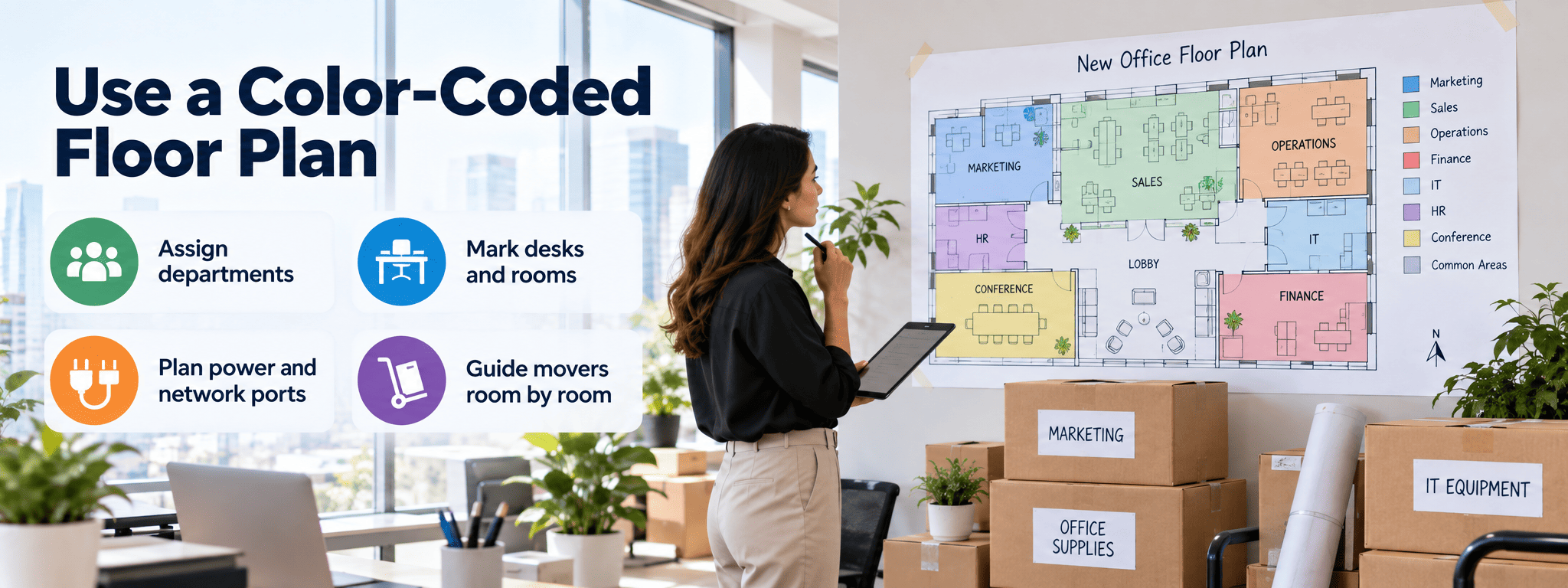
Visit the new space with a tape measure and a floor plan. Mark where each team will sit, and check the number and location of power outlets, network ports, and meeting rooms. Changes like new wiring or walls take weeks, so request them now.
Step 2: Book vendors early (about 3 months out)
Request written quotes from three or more movers, each based on an in-person or video walkthrough of your office. Our guide to hiring professional movers explains what to ask. Book internet and phone installation now, since providers can need several weeks.
If the move crosses state lines, check the mover’s registration. FMCSA requires companies that haul cargo between states in commercial vehicles to be registered and to have a USDOT number. Federal consumer rules for movers focus on household moves, so put the estimate, liability coverage, and claim terms for your business move in the written contract.
Ask each mover for a certificate of insurance (COI), and send it to both buildings if they require one. Confirm elevator reservations and loading dock hours with each property manager.
Step 3: Tell people and update your address (1–2 months out)
Announce the move to employees with the new address, date, and parking or transit details. Notify clients, suppliers, and service providers. Update your website, email signatures, online listings, business cards, and letterhead.
File a change of address with USPS using the “Business” option. USPS says mail forwarding can start within 3 business days, but it’s best to allow up to 2 weeks. The request changes your address with the Post Office only.
Update official records separately. Businesses with an Employer Identification Number (EIN) report a new address to the IRS on Form 8822-B. Banks, insurers, state licenses, and vendor accounts each need their own update.
Step 4: Declutter and pack (2–4 weeks out)
Moving is the best time to shred old files and get rid of broken furniture. Retired computers need secure data wiping first, so read our guide on what to do with old office IT equipment. Ask employees to pack their own desks, and give each person boxes and labels.
Pro tip: Use a color-coded labeling system. Assign a color to each room or department in the new office, and mark boxes with the color plus a desk or room number. Movers can place everything correctly the first time.
Step 5: Run moving week
Confirm the schedule, building access, and parking with the movers and both properties. Make sure the IT backups have finished before anyone unplugs equipment. On move day, keep a coordinator at each location to answer questions and check items off the inventory.
Step 6: Settle in (first week after)
Test internet, phones, printers, and every workstation before staff arrive. Walk through the space with your mover and note any damage in writing. Update your address on any remaining accounts and directories.
Give employees a short tour on their first day, and share a one-page guide with Wi-Fi details, printer locations, parking, and emergency exits. Keep a shared list of small fixes, like missing keys or loose cables, and assign someone to close each item within the first two weeks.

Office Move Checklist for IT and Equipment
The IT part of an office move covers backups, cabling, internet activation, and special handling for servers and leased equipment. Start on these items early, because any one of them can stop work in the new office:
- Back up all servers and computers, and confirm the backups work.
- Label every cable and take photos of how equipment is connected.
- Confirm your internet service is active before move day.
- Hire specialists for servers and network equipment.
- Ask leasing companies about moving copiers and printers, since some require their own technicians.
- Plan data security for any devices you’re retiring.
How Do You Keep Your Business Running During an Office Move?
Move after hours or in phases, keep your phones reachable, and give staff a remote-work plan while the new space is set up. Done well, customers barely notice the move:
- Move after hours. Schedule the main move for a Friday evening or weekend so staff can work Monday.
- Move in phases. Larger offices can move one department at a time, keeping key teams working.
- Forward your phones. Route calls to mobile phones or a cloud phone system during the switch.
- Plan remote work days. Let employees work from home while the new space is set up.
- Tell customers what to expect. Share any changes to hours, delivery addresses, or in-person visits.
Office Moving Budget: What to Include
An office moving budget should cover the move itself, IT, furniture, both leases, and a cushion for surprises. List these costs from the start, including the ones that are easy to forget:
- Movers, packing materials, and any specialty equipment handling
- IT and network setup, cabling, and internet installation fees
- New furniture or reconfiguring existing workstations
- Cleaning and repairs to restore your old space under the lease
- Rent on both spaces if the leases overlap
- New signage, printed materials, and updated marketing
- A cushion of 10–15% for surprises
DIY or Hire a Pro?
Good DIY project if…
- You have a small office with a few desks and no special equipment
- The move is local and you can do it over a weekend
- Staff can safely lift and load everything
Call a pro if…
- You have modular furniture that must be taken apart and put back together
- Servers, copiers, or sensitive equipment are involved
- The move crosses state lines
- The building requires movers with insurance certificates
- Downtime must be kept to a minimum
Commercial movers bring the crew, dollies, crates, and insurance a business move needs. Before you compare quotes, check price ranges in the HireRush moving cost guide.
Common Mistakes to Avoid
- Starting too late. Movers, IT vendors, and elevators book up weeks in advance.
- Forgetting the lease terms. Missing a notice deadline or restoration requirement can cost you your deposit.
- Leaving IT until the last week. Internet installation delays can shut down your business for days.
- Skipping the floor plan. Without one, movers guess where furniture goes and you rearrange later.
- Updating the address in only one place. Mail forwarding doesn’t update banks, licenses, or online listings.
- Not checking for damage right away. Report problems to the mover in writing as soon as you find them.
Final Thoughts
A successful business relocation starts with an office moving checklist and enough lead time. Plan and budget early, book movers and IT vendors months ahead, and keep staff and clients informed.
Update your address everywhere, pack and label with a clear system, and test everything before your team returns. A small office can handle a local move itself, while interstate moves, modular furniture, and servers call for professional movers.