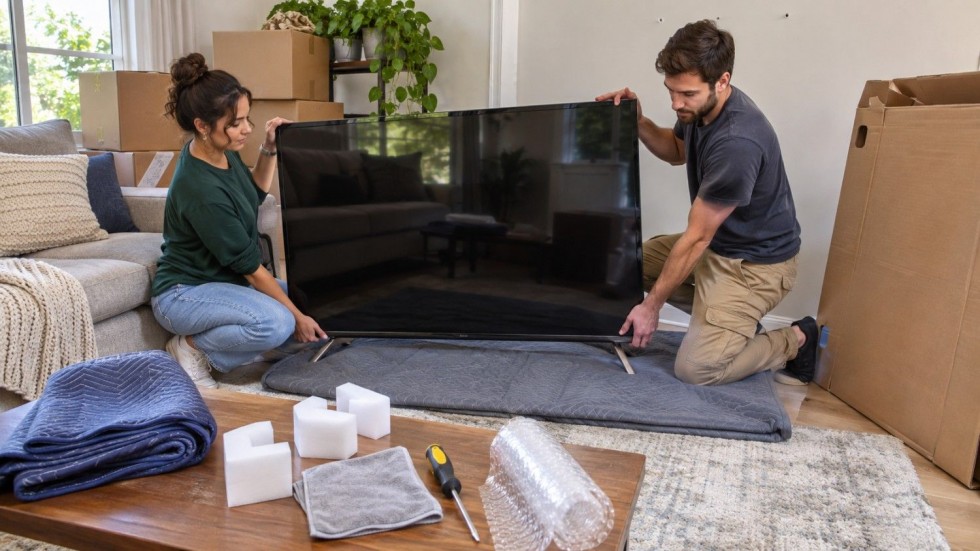
Your move is on Saturday, and the 65-inch TV is still bolted to the living room wall. The box went out with the recycling two years ago, so the screen is bare and the truck arrives in the morning.
Knowing how to pack a TV for moving keeps a four-figure screen off the curb. This guide walks through removing it safely, protecting the panel, boxing it with or without the original carton, and loading it upright. It also explains how long to wait before plugging in a TV that just rode through a cold November night.
How Do You Pack a TV for Moving?
Quick answer: Unplug the TV, photograph the cables, and remove the stand or wall bracket. Cover the screen with a soft cloth instead of tape, then box it snugly in the original carton or a kit with foam corners. Carry and load it upright, and after a cold trip let it warm to room temperature before you power it on.
Project snapshot
- Difficulty: Easy
- Time: 30-60 minutes, plus warm-up time at the new home
- Cost: $0 with the original box; about $25-$75 for a kit and supplies
- Skill: Beginner; a TV over 55 inches needs two people
- Note: These figures are editorial estimates and vary by store and region.
Pack this way for any move; a loose or flat screen is the one that cracks.
Original Box, TV Box Kit, or Blankets: Which Should You Use?
| Method | Best for | What you need | Typical cost | Protection |
|---|---|---|---|---|
| Original box + foam | Any move, especially long-distance | The box and foam inserts | $0 | Best fit |
| TV box kit | No original box | Telescoping box, foam corners | About $25-$45 | Good if snug |
| Cardboard + blanket wrap | Short local moves | Cardboard panels, corners, 1-2 blankets | About $20-$50 | Fair |
| Movers pack or crate | Large, OLED, curved or pricey TVs | Mover’s crew | Ask for a quote | Highest; mover is responsible for its packing |
| Car trip | Small TV, short distance | Blanket, pillows, seat belt | $0-$20 | Fair if kept upright |
The costs above are editorial estimates that vary by store and region. Choose the original carton whenever it survives, because it is molded to that panel.
Curved and OLED sets need support a flat kit cannot give, so crate them or hand them to a moving crew.
Tools and Materials
- A microfiber cloth or a foam screen cover
- A sheet of double-wall corrugated cardboard, cut larger than the screen
- Foam corner blocks or molded cardboard corners
- One or two moving blankets
- Stretch wrap, used over the blanket and never on the glass
- Packing tape and a marker
- Zip bags for the stand screws, VESA bolts, and the remote
- A screwdriver set, your phone camera, and ratchet straps
How to Pack a TV Step by Step
Step 1: Photograph the cables and note the model number
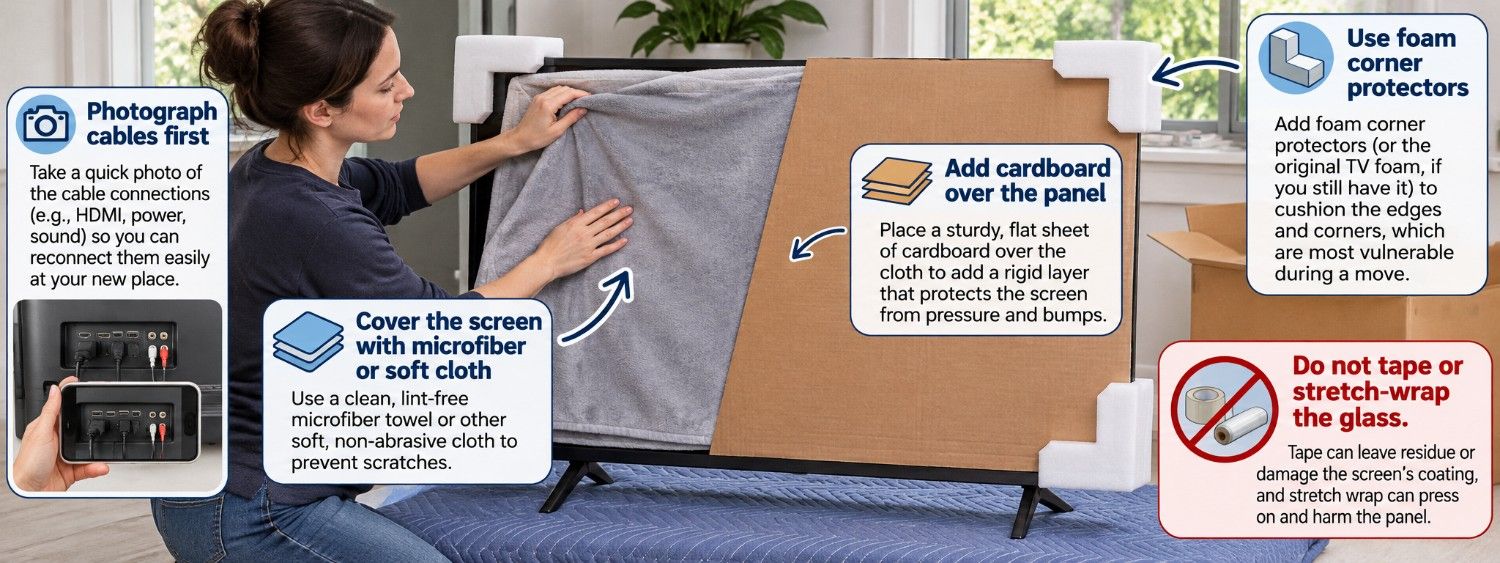
Photograph every port with the cables still connected, then write down the model and serial numbers. You need both for a damage claim and for the manual later. A 10-second video of the back panel beats a still photo when you reconnect at the new place.
Step 2: Unplug everything and bag the remote and cords
Cut power at the outlet, then unplug each cable by the connector rather than the wire. Let a set that was running cool for a few minutes before you move it. Take the batteries out of the remote so they cannot leak, and bag the remote and cords together.
Step 3: Remove the stand or lift the TV off the wall mount
To take off the stand, LG allows laying the screen face-down for a short time on a soft, flat surface. This is a work step, not a way to travel.
Bag every stand screw and VESA bolt, label the bag, and tape it to the stand base or the box. Lift the set off a wall bracket with two people, and never twist the panel.
Safety: A TV mounted high or over a fireplace, or one with in-wall power, is a job for a technician or an electrician. Do not pull a hardwired set off the wall yourself.
Step 4: Cover the screen without taping it
Lay a microfiber cloth or a clean cotton sheet over the panel, add a sheet of double-wall cardboard on top, then press foam corner blocks onto all four corners. Do not stick tape or stretch wrap to the glass, because the adhesive and the pull can damage the screen coating.
Packing crews work this way. LG adds that you should not touch the screen at all.
Step 5: Box it snugly and label it
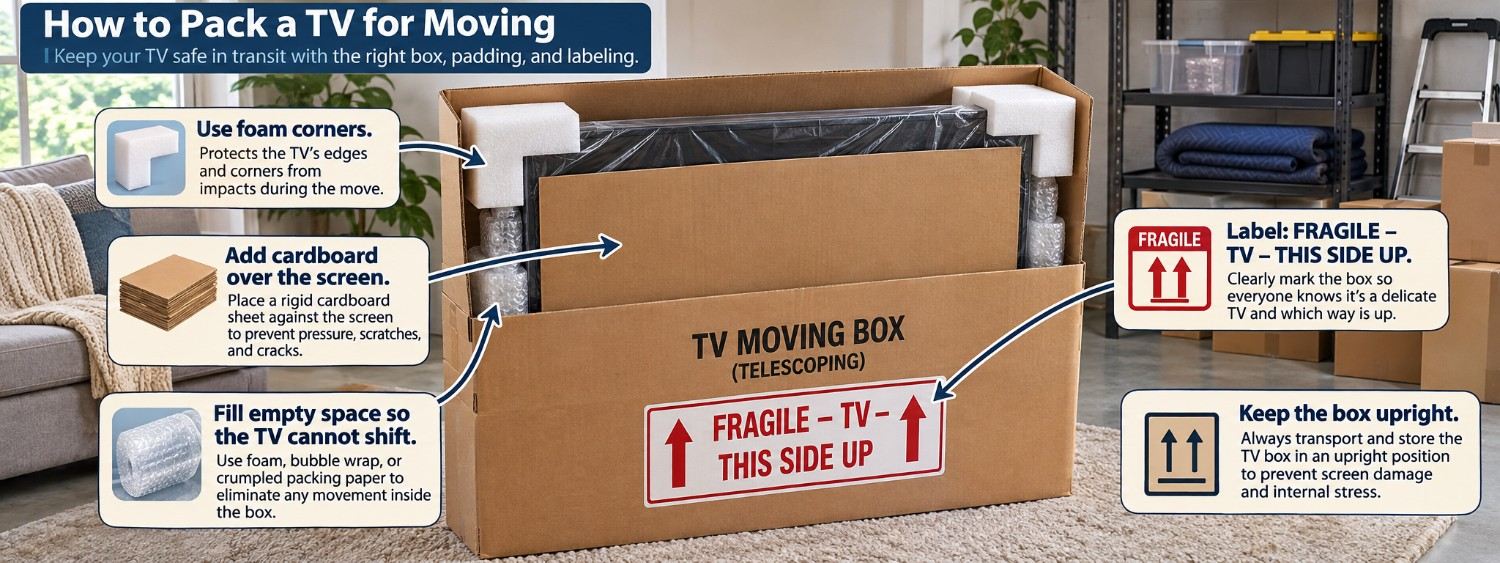
Slide the wrapped TV into the original carton or a telescoping TV box and fill every gap with foam, bubble wrap, or crumpled paper so the set cannot shift. Write “FRAGILE – TV – THIS SIDE UP – DO NOT LAY FLAT” on two sides and add up arrows on the top.
Shake the box gently; if the panel moves, add more filler before you tape it shut.
Step 6: Carry it with two people, screen facing away
Grip the bezel at the top and bottom corners and keep the screen facing away from your body. Never lift a TV by the screen, the stand, or the speaker grille, as LG warns. Walk the panel through doorways upright, and have your helper call out clearances before you move.
Step 7: Load it upright and strap it in the truck
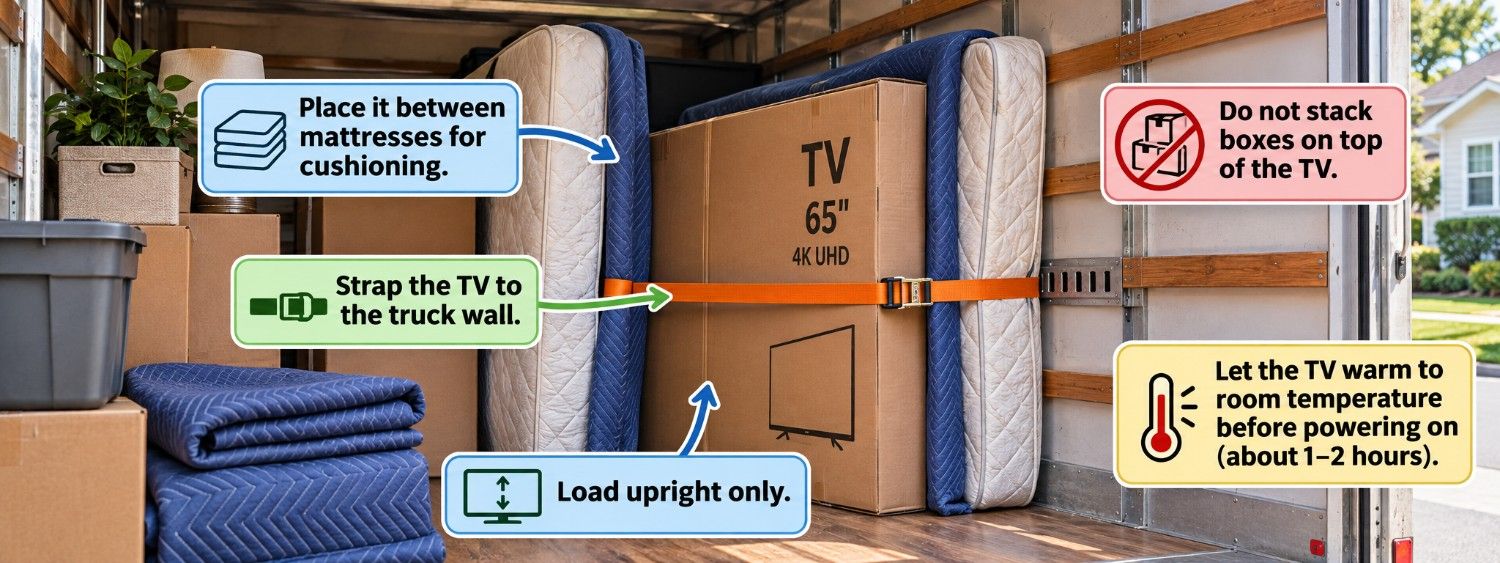
Stand the box on its long edge and push it against the truck wall or between mattresses, then lock it down with ratchet straps clipped to E-track or tied to the wall rail. Nothing should rest against the TV, and nothing goes on top of it.
LG’s OLED manual is blunt: keep the TV upright and never turn it on its side.
In a car, stand the set upright on the back seat, cushion the base with pillows, and run the seat belt through the frame rather than laying it flat in the trunk. For the rest of the load, see our guide to loading a moving truck.
Pro tip: Put a sheet of cardboard between the screen and the blanket. One blanket alone will not stop a box corner or a chair leg from pressing through the panel.
Step 8: Let it warm up before you turn it on
Bring the TV inside first and leave it in its box; never leave it overnight in an unheated truck, garage, or storage unit, because a cold panel collects condensation when it meets warm indoor air.
Sony’s BRAVIA help guide says to wait a few hours before powering on. After a freezing trip, let the set reach room temperature and dry before you plug it in.
How to Pack a TV Without the Original Box
Without the carton, learning how to pack your TV for moving means building a cardboard sandwich: one corrugated sheet behind the screen, one in front, foam corners at all four edges, and a blanket on each side. Wrap stretch wrap around the blanket, not the glass, and tape the wrap to itself.
For a car trip, pad the screen with a folded blanket, stand the set upright on the seat, and buckle it in. OLED and curved panels flex easily, so they are worth crating instead of stacking.
Pro tip: Tape the bag of stand and VESA screws to the stand itself. The hardware travels with the TV instead of vanishing into a moving box.
Will Movers Cover a Damaged TV?
Only as much as your valuation option allows. For interstate moves, the FMCSA sets Released Value at no more than 60 cents per pound per item, so a 50-pound TV returns about $30. Full Value Protection has the mover repair, replace, or pay for the item.
Items you packed yourself can shrink that responsibility, so list the TV’s model and value on the inventory and keep the Step 1 photos; skipping that shows up in our rundown of mistakes to avoid when hiring movers.
The FMCSA reserves “extraordinary value” status for items above $100 per pound, a bar most TVs miss; a $2,000, 50-pound set is about $40 per pound. Local moves follow state rules and your contract, so ask your insurer how a home policy values a moved TV.
A crew can also box the panel for you. Packing help runs about $30 to $50 per mover per hour and varies by region; our moving cost guide lists typical prices.
Setting the TV Up Safely at Your New Home
Tighten every stand screw, because LG warns that a loose screw can let the TV tip forward. Set it on low, stable furniture or anchor it to the wall following the CPSC’s Anchor It guidance. Reconnect the cables to match your photos, and keep the TV off the floor.
DIY or Hire a Pro?
- Good DIY project if… you have the original box or a snug kit, the TV is around 65 inches or smaller, the move is local, and you have a helper.
- Call a pro if… the TV is 75 inches or larger, OLED, or curved; it is expensive; the box is gone and the move is long; it hangs high or over a fireplace; the route has stairs and tight turns; it will sit in an unheated storage unit; or you want the mover to own the packing risk.
- Pack it yourself when the original box still exists; hire movers when the panel is large, expensive, or awkward to carry.
Common Mistakes to Avoid
- Laying the TV flat in the truck or trunk, which puts weight on the panel; keep it on its long edge against a wall instead.
- Taping or wrapping the screen, which can pull the coating; cover the glass with cloth and cardboard instead.
- Using an oversized box with no filler, so the set slides and corners crack; pack the gaps until it cannot move.
- Losing the stand and VESA screws, which stalls setup; bag and label them, then tape the bag to the stand.
- Resting other boxes on the TV, which flexes the panel; keep the top of the box clear.
- Powering on right after a cold ride, which can push condensation into the electronics; let the set warm and dry first.
How to Pack a TV for Moving: Final Checks
How to pack a TV for moving comes down to protecting the panel at every stage: photograph the cables, remove the stand, cover the screen without tape, and box it snug. Travel with the set upright, strapped or belted, and let it warm before the first power-on.
Most homeowners manage in an afternoon with the original carton and a helper. A 75-inch, OLED, or curved screen, though, is safer in a mover’s hands.